
For years, gaming setups looked like a spaceship control panel exploded inside a bedroom. Rainbow LEDs, three monitors at odd angles, cables cascading like vines. Nobody judged it, but nobody framed it either.
Then something shifted. The same people who care about their lighting, their color temperature, their desk proportions started treating the gaming corner like any other room in the house. Not a bunker. A space.
That’s the whole thesis here. A gaming room can be the best-looking room in your home, not the one you apologize for. These 25 gaming room setups cover every style, from warm minimalist to moody maximalist, each one built on real design principles rather than RGB-for-RGB’s-sake. Pick the ones that fit your space and your taste.
Quick-Start: The 5 Rules Every Stylish Setup Follows
- One light source to rule them: ambient light (lamp or bias lighting) at 2700–3000K first, screen glow second. Never the other way around.
- Cables get buried before anything else: a $15 cable raceway beats a $200 accessory every single time.
- Pick three colors, max: your wall color, one wood/metal tone, one accent. Everything else earns its place or leaves.
- The chair is furniture: match its color and material to the room, not the marketing.
- One display wall, not five: art, shelves, or panels in one zone; the rest stays calm.
1. The Backlit Wall Panel Setup
Mount walnut slat panels behind your desk and run a single warm LED strip behind them. The wood catches the light and throws soft vertical shadows, and suddenly your monitor looks like it’s floating in a boutique hotel lobby. Keep the desk surface almost empty: monitor, keyboard, one plant.
The panels cost less than people assume, and you only need enough to cover the wall behind the desk, not the whole room. Stain them to match your floors and the whole corner starts feeling intentional.
2. The Warm Wood + Brass Look
Swap the black office desk for an oak or walnut top on simple steel legs, then add brass wherever you can: a desk lamp, a small tray for your controllers, the frame of a leaning mirror. The metal repeats three times and reads as a design decision, not an accident.
This setup photographs beautifully because the warm tones kill the blue glare most gaming corners suffer from. Keep screens at a comfortable distance so the wood, not the monitor, dominates your peripheral vision.
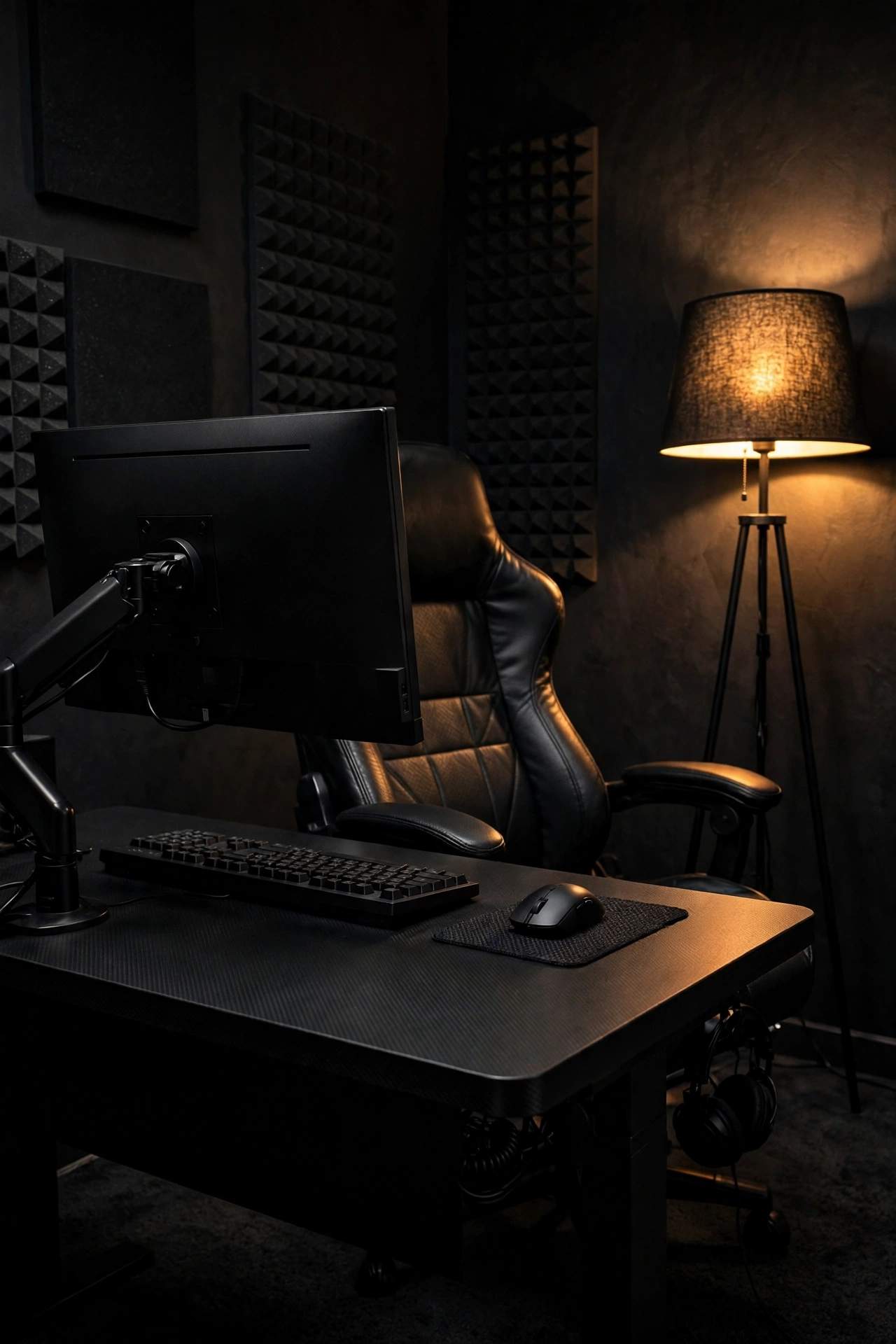
3. The All-Black Monochrome Rig
 Save
SaveGo full monochrome: matte black desk, black monitor arm, black keyboard with no backlighting, black chair in leather rather than racing fabric. Then light it with one warm floor lamp from the side, like a portrait studio.
Black on black only works when the textures vary, so mix matte, satin, and one glossy surface. The single warm light source keeps it moody instead of cave-like. This is the easiest setup to keep clean visually, because there’s nothing to clash.
4. The Minimal White Desk
A white or birch desk against a white wall, one slim monitor on an arm, a compact 65% keyboard, and a wireless mouse. Everything else lives in a drawer or a cabinet. The trick is cable management, because on white, every black cable screams.
Run everything through a white raceway under the desk and use white or braided-light cables where they must show. One green plant and a linen curtain soften the lab feel. Our warm minimalist living room ideas use the same philosophy: the calm comes from what’s removed, not what’s added.
5. The Corner Floating Desk
Mount a deep floating shelf across a corner at 29 inches high, supported by hidden brackets rated for your gear. No legs means the floor stays visible, which makes a small room feel twice as large. Pair with a lightweight chair you can tuck fully underneath.
Floating desks demand discipline: wireless peripherals, a monitor arm, and a single cable dropping to a floor outlet through a channel. Done right, guests won’t believe a PC lives there.
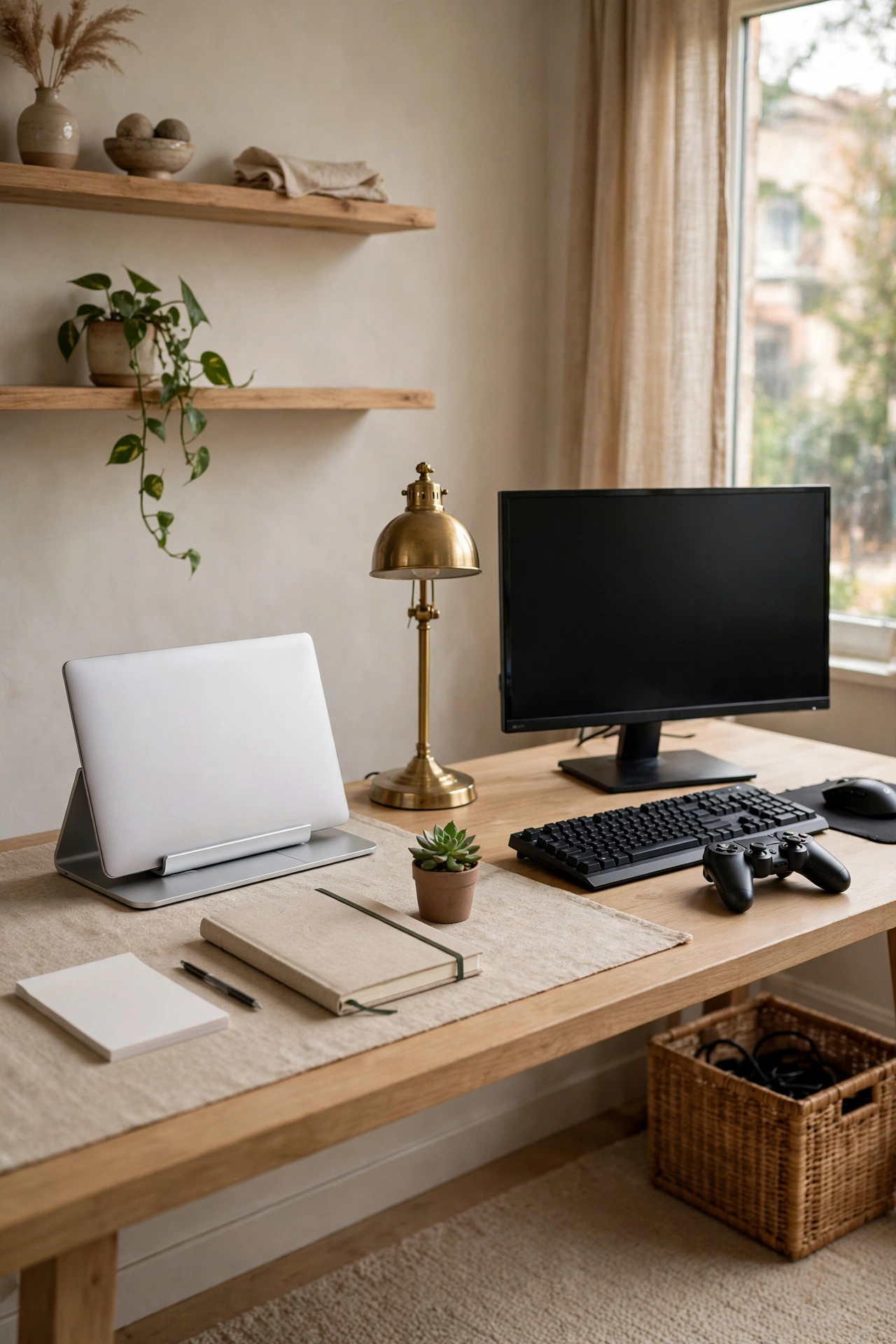
6. The Dual-Zone Desk
 Save
SaveOne long desk, two personalities: the left half is a clean work zone (laptop dock, notebook, plant), the right half is the battlestation (monitor, keyboard, controller dock). A small room divider, a desk lamp, or just a change in desk mat color marks the boundary.
This split keeps work-from-home life from bleeding into your downtime, which matters more than you’d think. When the work zone closes for the day, the whole desk feels like it belongs to your evening self.
7. The Media-Wall Lounge
Move the action to the sofa: mount the TV or a large monitor on a media wall with floating oak shelves on either side, add a low console for the console and controllers, and game from a proper armchair. No desk, no office chair, no excuses.
Style the shelves like any living room wall: books, a vase, one small piece of art. The gaming gear hides in the console drawers. This setup wins every “whose living room is this” contest because it’s a living room first.
8. The Neon-Free LED Glow
Keep LED strips but ditch the rainbow cycle. Set every strip to a single static color, warm amber or deep teal, at 30% brightness. Bias lighting behind the monitor and under floating shelves is enough to make the room glow without the rave.
Static single-color light reads as design; cycling color reads as a demo mode you forgot to turn off. Amber flatters wood and skin tones, teal flatters grey and black. Pick one and commit.
9. The Retro Arcade Corner
 Save
SaveLean into nostalgia properly: a single restored-style arcade cabinet or a CRT-style monitor on a wooden credenza, framed pixel-art prints in matching frames, and a warm Edison-bulb lamp. The room should feel like a 1980s rec room remembered fondly, not assembled from auction lots.
Limit the retro to one corner so it reads as a collection, not clutter. Modern controllers charging on a brass tray nearby tell the real story: you love the old stuff, but you live in the present.
10. The Cozy Console Nook
A deep armchair angled toward a TV on a low walnut stand, a chunky knit throw, a side table for snacks, and a floor lamp with a fabric shade. The console slides into the stand; controllers rest in a felt tray on the side table.
This is the lowest-effort setup on the list and one of the most inviting, because it borrows its entire vocabulary from reading nooks. Soft textiles do what LEDs can’t: they make people want to sit down.
11. The Bookshelf Backdrop
Put your desk in front of a full bookshelf wall and let the spines be your decor. Style the shelves loosely: games and books mixed, a few plants on top, one shelf left intentionally sparse. The wall gives video calls and streams a cultured backdrop for free.
Keep the desk itself sparse so the eye has one busy zone and one calm zone. A picture light across the top of the shelves at night turns the whole wall into a feature.
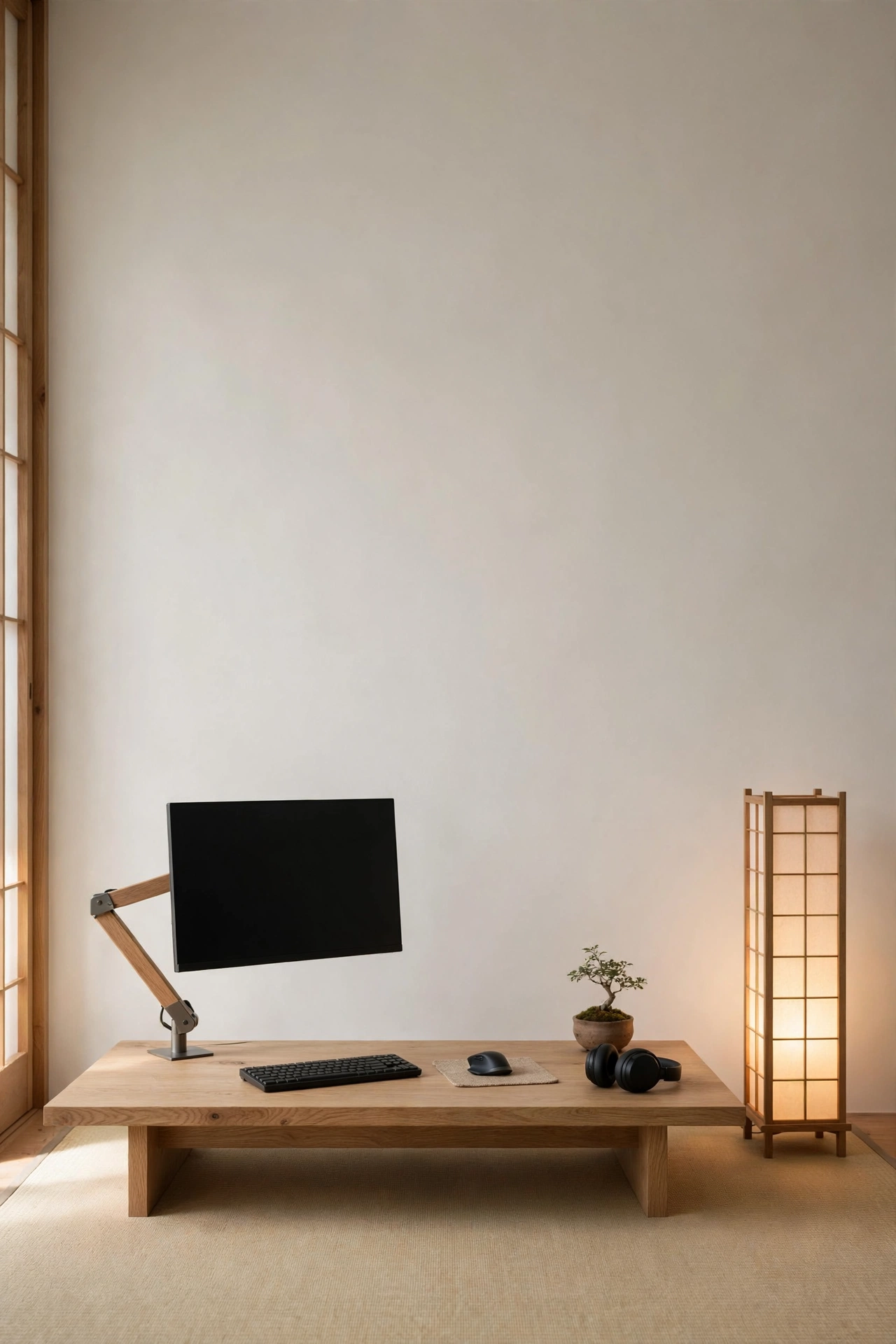
12. The Japanese Minimalist Corner
 Save
SaveA low-profile desk in natural oak, a single monitor on a wood-and-steel arm, a shoji-style paper floor lamp, and a tatami-toned rug underfoot. Everything sits lower than Western setups, which changes the whole posture of the room.
The discipline here is negative space: for every object on the desk, something must be stored away. The paper lamp’s diffused glow is the only “RGB” you need, and it’s been flattering rooms for centuries.
13. The Industrial Pipe-Shelf Wall
Black pipe brackets and reclaimed-wood shelves on a brick or concrete-look wall, desk below in the same wood. The hardware is the decor: elbows, flanges, and a cage-style pendant light overhead. Add a dark green plant for contrast.
Industrial works for gaming because the aesthetic already expects visible tech. Route your cables along the pipes and they disappear into the look instead of fighting it.
14. The Curved Ultrawide Command Center
One curved ultrawide instead of three monitors: fewer bezels, fewer cables, one clean sightline. Mount it on an arm so it floats above a slim desk, and flank it with two identical bookshelf speakers on isolation pads.
The single-screen setup looks dramatically calmer than a triple-monitor array, and the symmetry of the speakers frames everything. Keep the wall behind it a solid muted color so the curve gets all the attention.
15. The Under-Stair Setup
 Save
SaveThat dead space under the stairs is a gaming room waiting to happen. A custom or cut-to-fit desk slides into the low side, the monitor sits where the ceiling is tallest, and the sloped wall gets slat panels or paint in a deep tone.
Add a picture light under the stair above the desk for task lighting, and a small stool that tucks away completely. It feels like a secret clubhouse, which is exactly the point.
16. The Daylight-First Rig
Place the desk perpendicular to a window, never facing it or backing to it. You get natural light on your face for calls and zero screen glare, and the window becomes your “art.” Sheer linen curtains soften the light without darkening the room.
This setup looks best in photos because daylight flatters everything. A light oak desk and white walls multiply the brightness; add one warm lamp for evenings so the room doesn’t die at sunset.
17. The Green Plant Setup
Surround the desk with plants at three heights: a tall fiddle-leaf or olive tree in one corner, trailing pothos on a shelf above the monitor, and one small succulent on the desk itself. The greenery does the decorating so the tech can stay simple.
Plants also solve the “cold tech corner” problem better than any accessory. Just keep leaves off the screens and vents, and pick low-light varieties if the corner is dim.
18. The Terracotta & Earth Tones Room
 Save
SavePaint one wall in warm terracotta or clay, pair it with a walnut desk and cream textiles, and watch the whole room warm up. Our guide to chocolate brown and terracotta decor ideas shows how these tones make tech feel handmade rather than manufactured.
Keep the accent wall behind the desk so it frames your setup in every photo and call. Black peripherals pop beautifully against clay tones, like punctuation marks.
19. The Acoustic Panel Gallery
Arrange fabric acoustic panels in a gallery pattern: a grid, a chevron, or an asymmetric cluster in two or three muted colors. They tame echo for streams and calls while looking like modern art.
This is one of the few setups that is genuinely better for its function. Choose panels in colors that match your palette, and leave breathing room between them rather than covering the wall edge to edge.
20. The Shared Partner Desk
A six-foot desk split down the middle: two monitors, two keyboard trays, one shared cable spine down the center. Each half gets its own lamp and chair, but the finishes match so it reads as one piece of furniture.
The shared spine is the secret: one power strip, one raceway, zero cable wars. Add a small plant or photo frame at the center line as a neutral zone. Couples who game together need a desk that respects both setups.
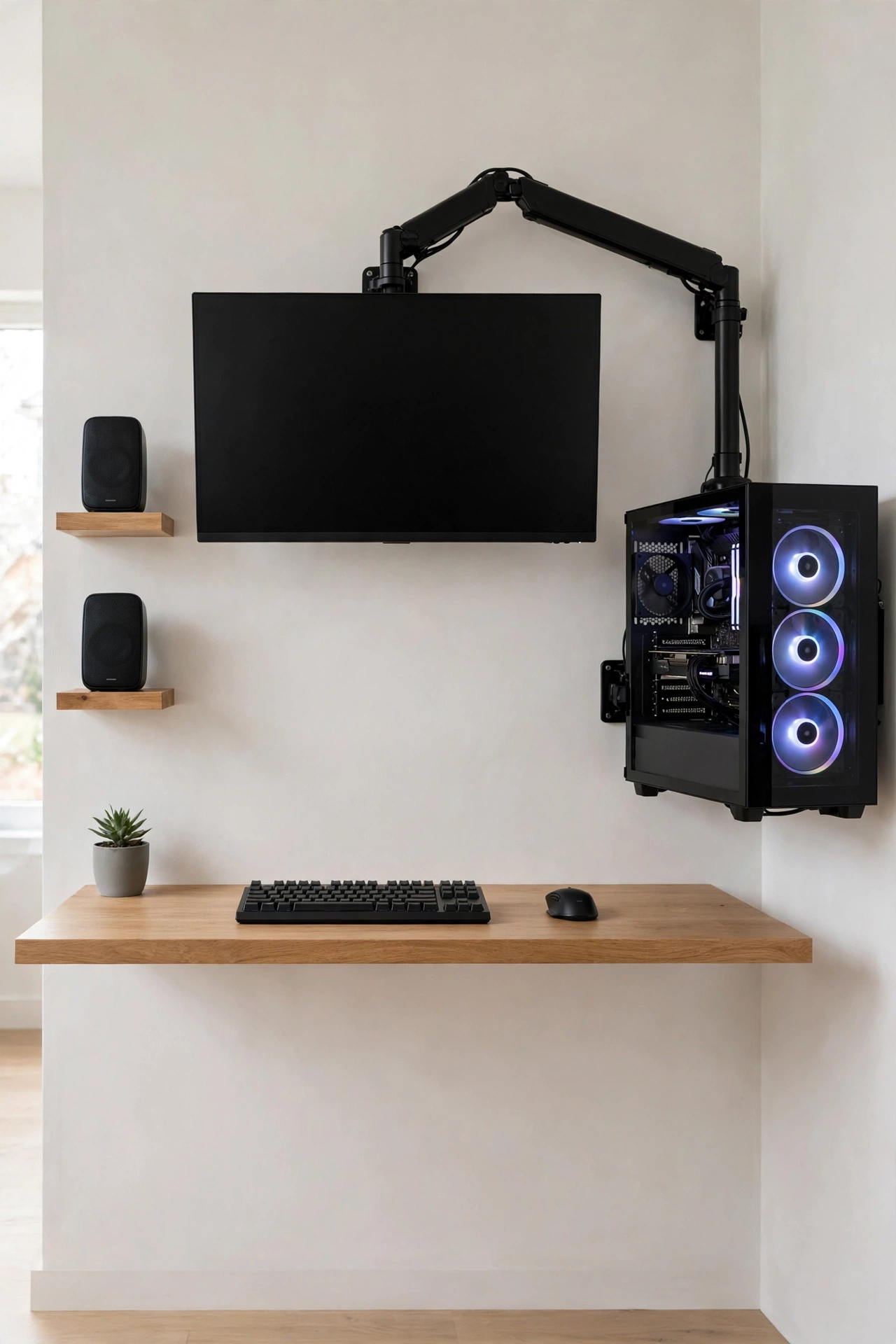
21. The Wall-Mounted Everything Rig
 Save
SaveMount the monitor on an articulated arm, the PC on a wall bracket beside the desk, and even the speakers on small shelves. The desk surface holds only keyboard, mouse, and one personal object.
With the floor and desk clear, cleaning takes minutes and the room feels twice its size. This is the setup for people who love tech but hate looking at it.
22. The Moody Burgundy Room
Deep burgundy or oxblood walls, brass picture lights, a dark wood desk, and black leather seating. It reads like a private members’ club, and gaming in it feels like an event.
Dark walls need one strong light layer to avoid gloom: a warm floor lamp in the corner plus bias light behind the monitor. Keep ceilings and trim light to stop the room from closing in.
23. The Hidden-Cable Media Console
A closed credenza with ventilated back panels holds the console, the router, and a power strip. Controllers charge inside a drawer on a USB hub. From the sofa, you see furniture, not hardware.
Ventilation matters: leave two inches behind the console and drill discreet vent holes if the back is solid. The result looks like a styled living room that happens to play games.
24. The Loft Nook
 Save
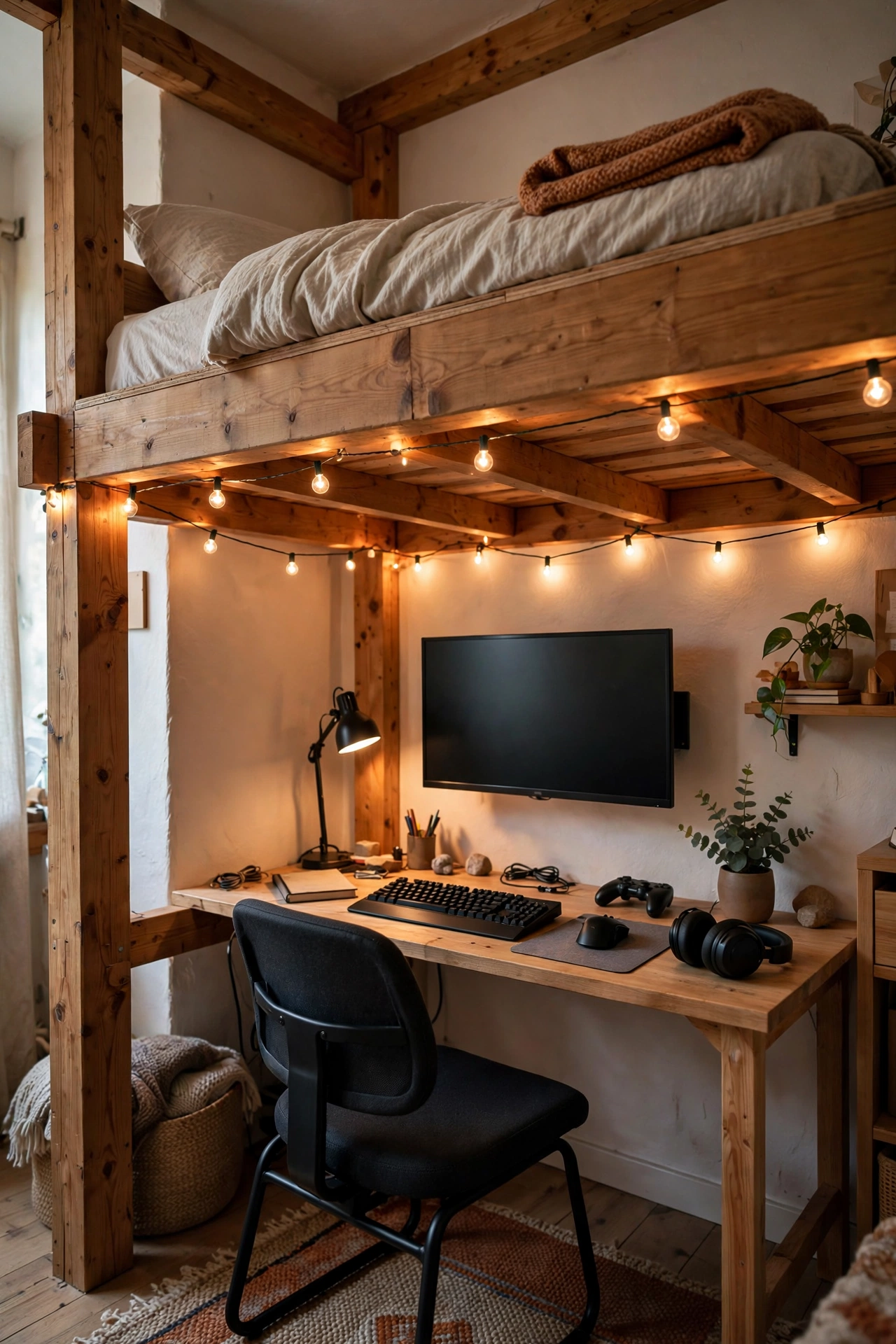
SaveTuck the setup into a loft bed’s lower zone or a mezzanine corner: desk under the sleeping platform, string-free warm fairy lighting along the beams (static warm white only), and a rug that defines the zone.
Lofts force vertical thinking: wall-mount the monitor, use the bed frame’s posts for a shelf, and keep the floor to a chair and a rug. It’s the ultimate small-space power move, in the same spirit as our small apartment decor ideas for tight corners.
25. The “Gallery Room” Setup
Treat the gaming corner like a gallery: one oversized framed print above the desk, a single sculpture or object on a floating shelf, museum-style picture lighting. The tech sits below the art, literally and visually secondary.
This setup signals that your taste extends past your hobby. Choose art you genuinely love, not “gamer art,” and the room reads as a collector’s space that happens to have a great rig in it.
Bringing It All Together
The thread running through all twenty-five setups is restraint. One light story, one palette, cables handled, and a room that would look good even with the screens off. Start with the cable raceway and the lighting, then pick the style that matches the rest of your home. Your gaming corner doesn’t need to hide. It needs to belong.
Frequently Asked Questions
How do I make a gaming setup look good in a small bedroom?
Go vertical and go light: a wall-mounted monitor, a floating desk or a slim console table, and one warm light source. Keep the palette to two or three colors and hide every cable in a raceway. Small rooms look best when the floor stays visible, so skip bulky tower cases on the ground.
What is the best lighting for a gaming room that still looks stylish?
Layer it: bias lighting behind the monitor to reduce eye strain, one warm ambient lamp (2700–3000K) for the room, and avoid overhead fluorescents entirely. Static single-color LED strips beat cycling rainbow modes for a grown-up look. Daylight matters too, so position the desk perpendicular to windows.
How can I hide cables in a gaming setup cheaply?
A cable raceway under the desk handles the big runs, adhesive clips route along desk legs, and a fabric cable sleeve bundles monitor cables into one line. Run one cable drop to a floor outlet or power strip mounted under the desk. The whole job costs under $25 and changes the look more than any new accessory.
What colors work best for a stylish gaming room?
Stick to three: a wall color (warm white, deep green, clay, or charcoal), one wood or metal tone (oak, walnut, or brass), and a single accent. Warm palettes flatter screens and skin; dark palettes look dramatic but need strong warm lighting. Avoid more than one saturated accent color in the same sightline.
Do I need an expensive chair for a good-looking gaming setup?
No. An ergonomic office chair in a neutral fabric or leather looks better than most racing-style gaming chairs and costs less. Match the chair’s color to your palette, and the whole setup reads as furniture rather than equipment. Comfort matters more than branding.

1 thought